①
Parse the vector
Every <path>, <rect>, <circle>, <polygon> and group transform is read and flattened to absolute millimetre coordinates. Each closed outline becomes a piece; loops inside it become holes.
SVG → WeCreat MakeIt! • .wws generator
Upload an SVG, choose your WeCreat machine and material size, and
wwsgen nests your shapes and hands you a .wws
project that opens straight in MakeIt!. No GUI fiddling, no copy-paste.
Drop in an SVG and get a nested, cut-ready project that opens straight in WeCreat MakeIt!.
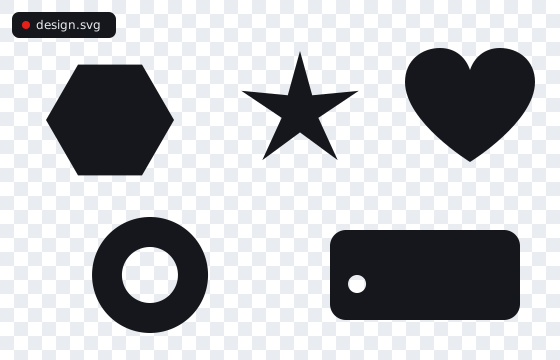
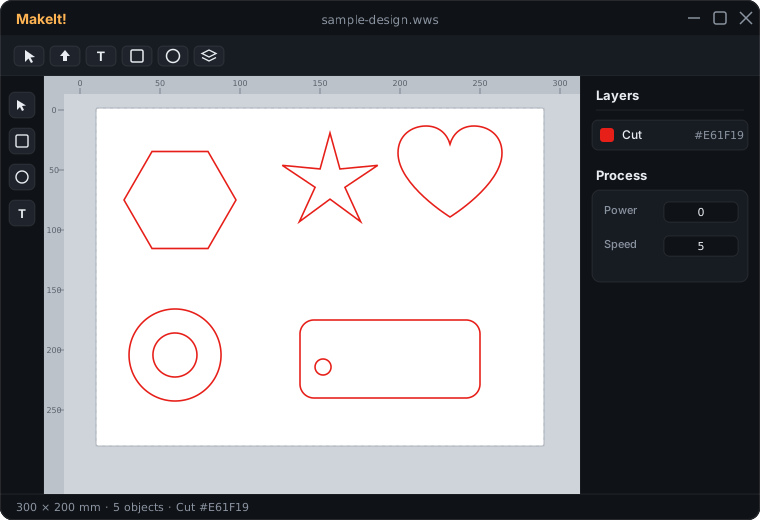
Three steps to a cut-ready .wws.
SVG, PDF, Illustrator .ai, DXF, or an image (PNG/JPG/GIF) — all read natively.
No file handy?
Sets the maximum work area. The cut geometry is identical across models.
The sheet your pieces are nested onto, in inches.
Operations are assigned by colour in your file:
red stroke #E61F19 → cut,
any fill → engrave,
any other stroke → line (score).
Each gets its own power/speed/passes above.
Your file is converted on the fly and never stored. Sign in to save your uploads.
A real reverse-engineered pipeline — not a re-skin.
Every <path>, <rect>, <circle>, <polygon> and group transform is read and flattened to absolute millimetre coordinates. Each closed outline becomes a piece; loops inside it become holes.
Pieces are raster-nested with free rotation and real-polygon collision, kept your chosen spacing apart. Parts that don't fit spill onto extra sheets — each becomes its own MakeIt! canvas.
Output is the genuine MakeIt! v3.0.4 JSON/Fabric.js envelope with exact vector geometry and a red #E61F19 cut layer — confirmed to open in MakeIt!.
Pick a model to bound the work area — or choose Custom for any laser.
Get clean cuts in — and know what to do with the .wws that comes out.
width/height + viewBox, sizes import 1:1; otherwise 1 user unit = 1 mm. Use the Scale option to correct.<text>, <image> and <use> are ignored — convert text to paths first..wws into WeCreat MakeIt! (or File → Open).#E61F19 layer is the cut..wws file?It's WeCreat MakeIt!'s project format. WeCreat markets it as closed and no-export, but under the hood it's plain JSON built on Fabric.js — so it can be generated programmatically. wwsgen writes the same v3.0.4 envelope MakeIt! produces.
The generator is verified to produce MakeIt!-openable files (a known-good 100×100 mm cut square round-trips correctly). The SVG→nest converter is structurally validated; as with any reverse-engineered format, always open the result in MakeIt! and check dimensions before cutting.
SVG, PDF, Adobe Illustrator (.ai), and DXF are read natively — vector geometry in, cut-ready .wws out. Operations follow colour: a red stroke (#E61F19) cuts, any fill engraves, any other stroke becomes a line (score). Images (PNG/JPG/GIF/BMP/WebP) are embedded as a fill-engrave by default, or can be traced into cut outlines (experimental, best for high-contrast art) via the Image-mode option.
Each closed outline in your SVG is placed independently and nested to save material. A shape fully inside another (like a ring) is treated as a hole. If everything can't fit on one sheet, extra sheets are added automatically as additional canvases.
No. Your file is converted in a temporary working directory and deleted immediately after the .wws is returned. Nothing is logged or retained.
No. wwsgen is an independent, unofficial project. The .wws format details are reverse-engineered and may change between MakeIt! versions.